

Want to earn some extra credit in this course? Here are some opportunities for you to do so. These opportunities are available throughout the semester. If you want to earn extra credit, please plan ahead to meet these criteria. This isn’t something you can complete during the last week of class.
Attend Tutoring For Chemistry
Use Riverland’s free tutoring services to improve your understanding of course materials and earn some extra credit. This video demonstrates how to access Riverland’s tutoring services.
How To Document This Extra Credit
- Please use this document to record the date you met, how long you met with the tutor, the tutor’s name, and the topics discussed. Download the document to your computer before adding any information to the document.
- If you meet face-to-face with your tutor, have the tutor sign the document in the space provided for the session.
- If you meet with an online/Zoom tutor, they won’t be able to sign your paper. Instead, please indicate you met with an online tutor through Riverland’s tutoring services. I can verify your online tutoring through Riverland.
Guidelines for Tutoring Extra Credit
- For every 1 hour of tutoring/help session attended, you can earn 2 bonus points (up to a total of 20 bonus points).
- You do not need to attend for one continuous hour at a time. For instance, attending two 30-minute tutoring sessions will count as one full hour of tutoring.
- You will receive credit only for tutoring that adds up to 1 full hour. For instance, if you attend 4.5 hours of tutoring over the semester, you will receive extra credit for the 4 hours, but not the half-hour.
- If your main campus is not Riverland, you are welcome to use the tutoring services located at your local college. Please have them complete the paperwork described above and indicate the campus you used for tutoring in the margin next to the tutoring session.
- All tutoring must be for this class (the one you are currently taking with me). I will not honor the time spent tutoring other courses or past semesters.
- This extra credit option is due to the extra credit assignment folder before you complete the final exam for the course.
Have Your Writing Assignments Reviewed Before Submission
Use Riverland’s free tutoring services to review and improve your laboratory reports, discussion board submissions, water quality project assignments (CHEM 1201), or ocean acidification project assignments (CHEM 1202).
How To Document This Extra Credit
- If you meet with your reviewer face-to-face or on Zoom, use this document to record information about your meeting. Download the document to your computer before adding any information to the document.
- If you use the Tutor.com access offered through Riverland, submit the document they provide you with their feedback (i.e. don’t use the form linked in the previous bullet).
Guidelines For Writing Review Extra Credit
- You can earn 10 bonus points for each lab report, discussion board, or written assignment (see outlined above) reviewed by the tutor. If you are unclear if an assignment is eligible for this extra credit opportunity, contact your instructor.
- The final submitted copy of your assignment should include the edits suggested by the person who reviewed your paper.
- This extra credit review option must be submitted to the extra credit assignment folder before you submit the assignment that was reviewed to the assignment folder in Brightspace. For example, I would submit the documentation showing I had a tutor review my Physical Properties of Matter Lab report to the extra credit assignment folder before I submitted my edited, final copy of my Physical Properties of Matter lab report to Brightspace for grading.
- Do not submit your extra credit proof to the assignment folder with your assignment submission. All extra credit must always be submitted to the extra credit assignment folder.
- If your main campus is not Riverland, you are welcome to use the tutoring services/writing center located at your local college. Please have them complete the paperwork described above and indicate which campus you used for your review on the document linked previously.
Complete the Brightspace Online Training Offered Through Infobase
Infobase is a free database of tutorial videos available to students. This is an amazing resource to help students develop the skills necessary to succeed in college and life. One of these resources includes a tutorial on how to use Brightspace.
Classes at Riverland Community College use Brightspace to provide course content, grades, and other resources for students. It is critical students know how to effectively and efficiently use Brightspace to succeed in their studies.
How To Document This Extra Credit
- These videos are linked in this course and are accessible by signing into Infobase, searching for “Brightspace 10.7” and selecting the training for students. Use your StarID and password to access Infobase. You can also access this tutorial through this link. A screenshot of this tutorial in Infobase is provided below.
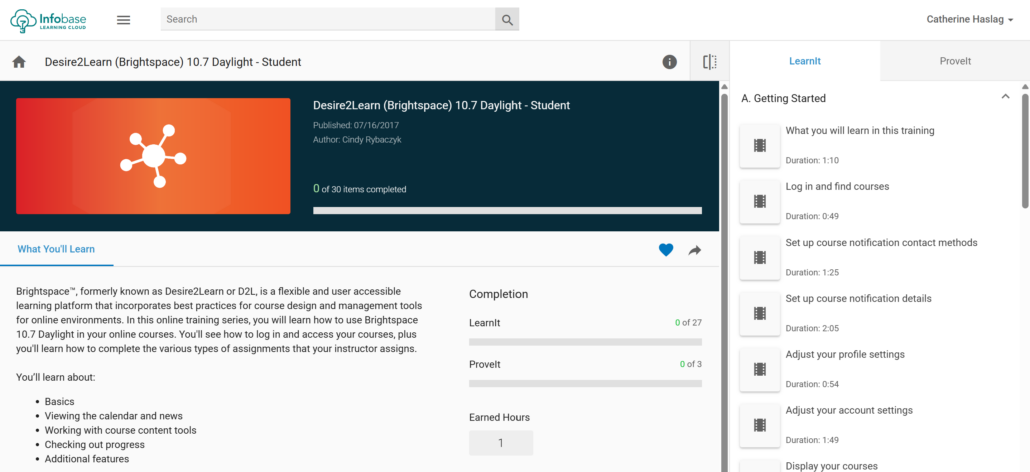
- Once you have completed all portions of the LearnIt and ProveIt sections (see above image under “Completion”) with this tutorial, you will be provided a certificate of completion for the training. You must submit this certificate to the extra credit assignment folder to receive credit.
- You can access this certificate by signing into Infobase. Click on your name in the top right corner and select “Accomplishments” from the menu. Your certificate should be listed here (under “Certificates” on the upper left side of the screen). You can download it for submission to the extra credit assignment folder.
- If your certificate isn’t listed here, please contact the Riverland Help Desk and submit a ticket for assistance. I am not able to assist you with issues with Infobase.
Guidelines For the Brightspace Tutorial Extra Credit
- This extra credit opportunity is worth 10 points.
- Be sure you have watched all the videos all the way to the end. Don’t stop them even a second early or Infobase won’t register the video as complete.
- Do not submit a screenshot or any other file type for this to the assignment folder. You must submit the pdf certificate. I will not accept any other document as proof you completed this training.
- This extra credit option is due to the extra credit assignment folder before the end of the fourth week of class.
Other Notes on Extra Credit
- There are other extra credit Easter Eggs hidden in the class. It pays to be engaged in class, read all course content, and check announcements in Brightspace regularly so you don’t miss any of these Easter Eggs.
- All extra credit must be uploaded to the extra credit assignment folder provided on Brightspace and within the due date guidelines provided above.
- A student can earn no more than 50 extra credit points in the course of a semester, no matter how many total extra credit points are possible for a course.
This page was published on July 22, 2022, and last updated on May 12, 2026.
Extra Credit Opportunities ©2026 by Catherine Haslag is licensed under CC BY-NC-ND 4.0